
Part A: Find your leads (every day)
Step 1: Open your forms list
Go to business.facebook.com. Tap All tools, then Instant forms.
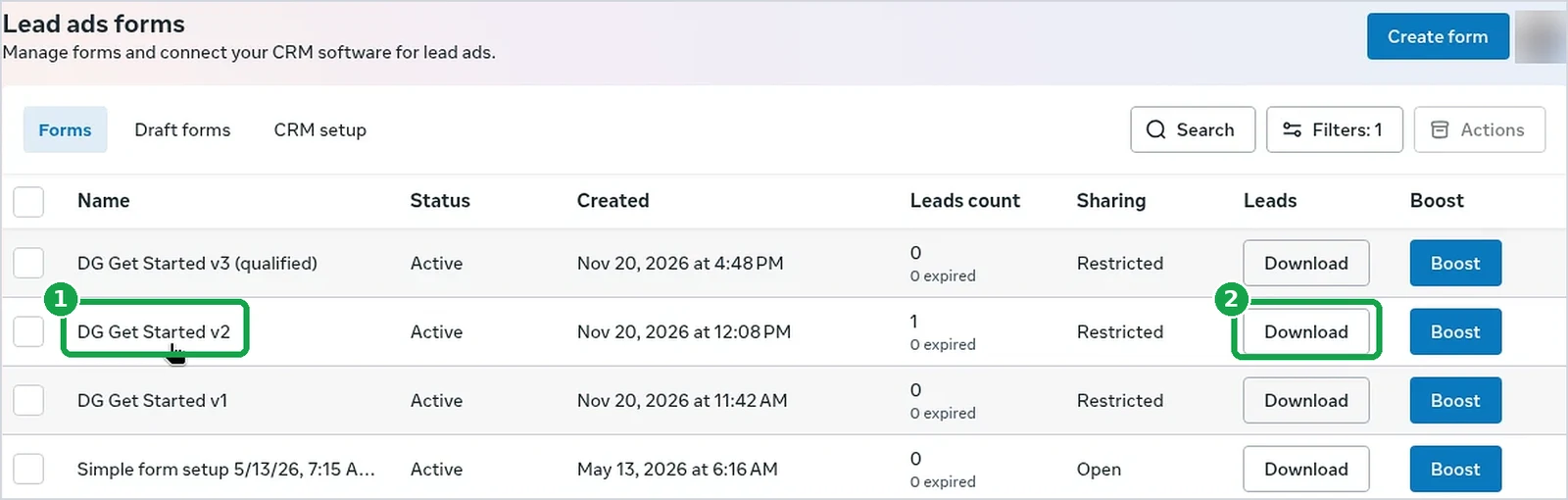
You should now see: a list of your forms.
Step 2: Look at the Leads count
Find the Leads count column. Any number above 0 means you have leads.
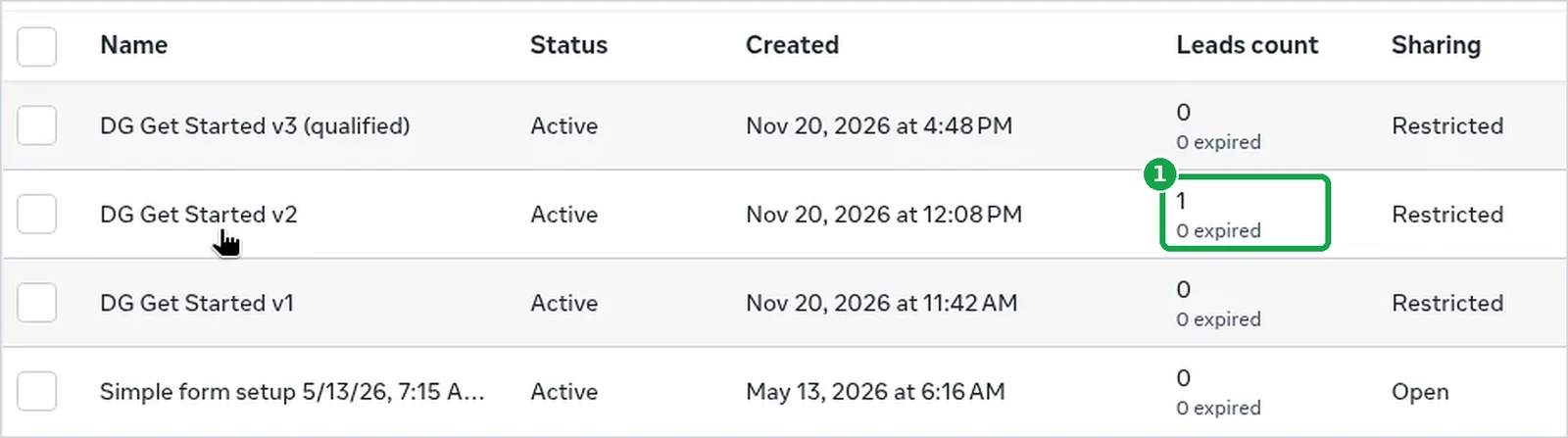
You should now see: a number next to each form. Mine said 1.
Step 3: Tap Download to get their info
Tap Download on that form's row (the button marked 2 in the Step 1 picture). You get a file with each person's name, phone and email.
Another way: Leads Center. It's also under All tools. The first time, you'll see a welcome screen. Tap Continue. Then you'll see a list with each lead's name, phone, email and which form they used. You can mark each one as you call them.
The Page dashboard only shows a count. It won't show who it is.
Check my Meta Business Suite for new leads. Open Instant forms and Leads Center. Tell me how many leads came in since [DATE], which form and ad each came from, and where I can open them. Don't change anything.You should now see: a file with your leads in it.
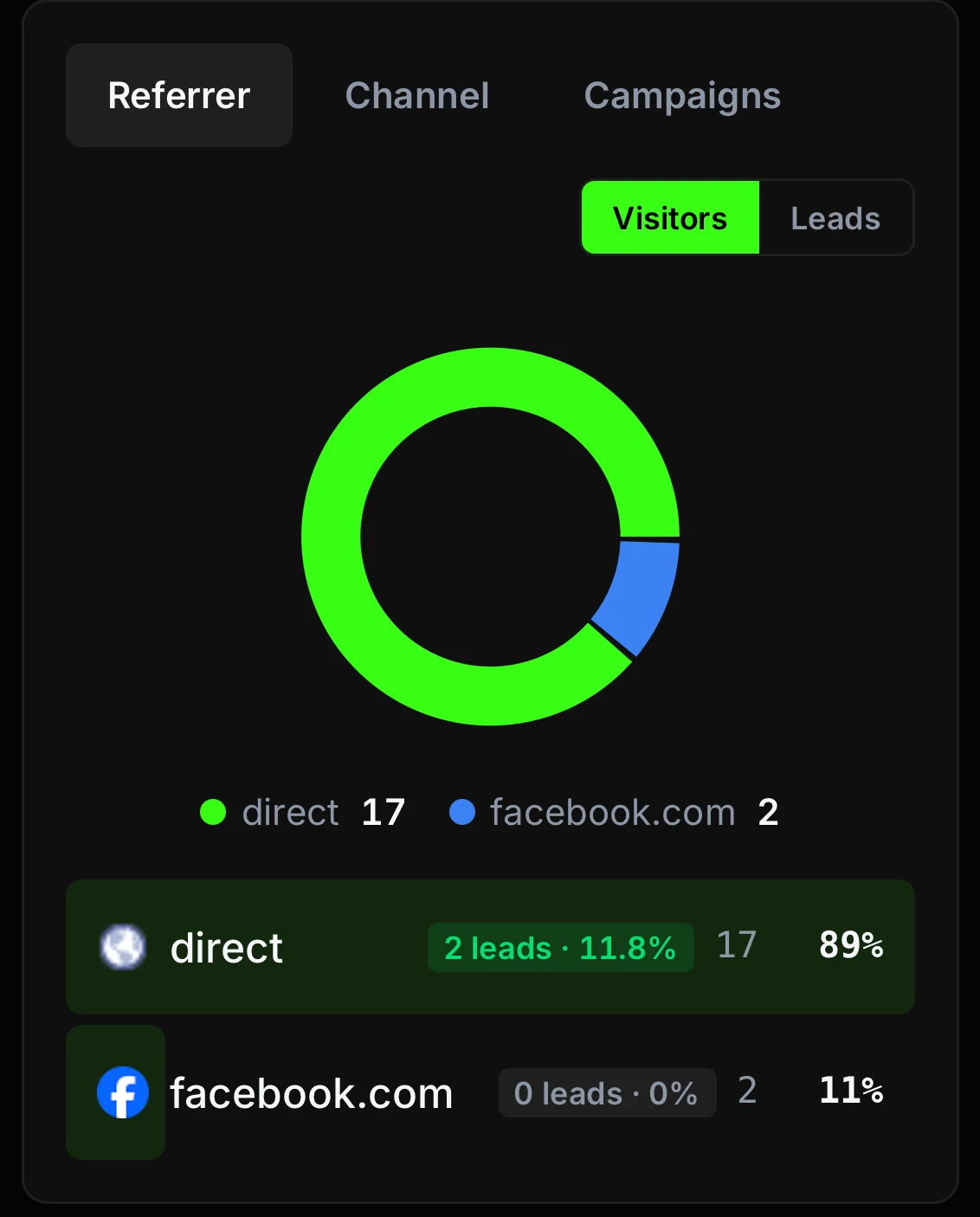
Don't look for these leads in your website stats. Form ads keep the lead inside Facebook. People never visit your site. My tracker shows facebook.com sending 2 visitors and 0 leads. The real ad lead was in Facebook's forms list. Check both places.
Step 4: Call them the same day
Form leads go cold fast. Call or text that day. A homeowner asking about a garage floor is probably asking two other companies too.
You should now see: the lead marked as called, in Leads Center or your own list.
Part B: My 10-minute Friday check
I check my ads once a week, on Friday. That's it. Changing ads every day makes them worse, because every change makes Facebook start learning over.
Step 5: Open your Weekly view
Open the Weekly view from part 3. Set the date to Last 7 days. Or ask your AI. Grok sends me mine every Friday morning.
Run my weekly Facebook ads check. Account: [AD ACCOUNT NAME]. My goal is $[GOAL] per lead.
Last 30 days, from my own notes:
- Estimates booked: [NUMBER]
- Estimates that happened: [NUMBER]
- Jobs sold: [NUMBER]
- Average job or monthly price: $[AMOUNT]
Compare spend, leads, cost per lead, CTR and CPM to last week. Tell me what to pause, what to watch, what hasn't spent enough to judge, and if my ads are wearing out. Only read my account. Don't change anything.

You should now see: "Columns: Weekly" and "Last 7 days."
Step 6: Compare cost per lead to your goal
Look at Cost per result. That's your cost per lead. Under your goal and no rule fired? You're done. Log off.
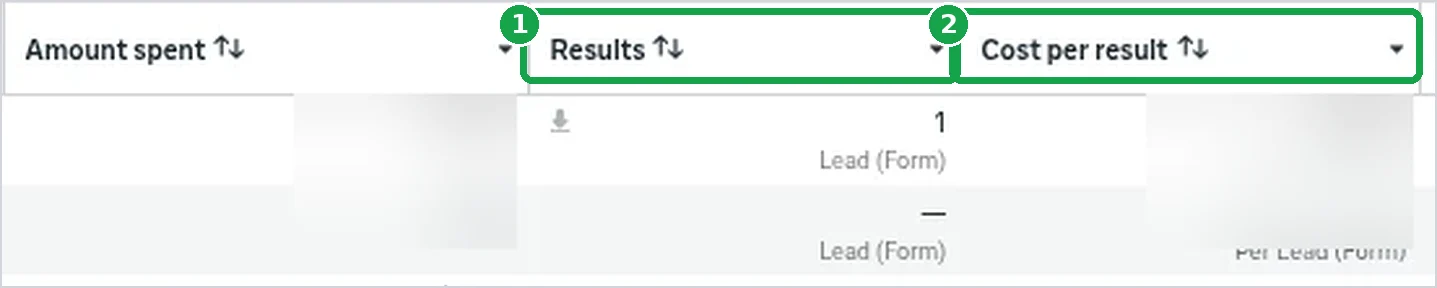
You should now see: your cost per lead next to each ad.
Step 7: Check the list and do what it says
What to do with what you see
| If you see... | Do this |
|---|---|
| Cost per lead under your goal | Nothing. Leave it alone. |
| A slow few days | Nothing. Every change restarts Facebook's learning. |
| An ad spent less than your goal | Nothing. It hasn't been tested yet. |
| An ad over 2× your goal after about $150 spent | Turn it off yourself. The rules only catch zero-lead ads. |
| CTR dropping AND 30-day frequency over 3 | Make new ads. Only one of the two? Keep watching. |
| Lots of clicks but almost no leads | Fix the form before making more ads. |
| Cheap leads, but nobody books or shows up | Fix how fast you call back, not the ads. |
| Well under your goal for a couple of weeks | Raise the budget, up to 30% at a time. |
| An ad is working | Don't copy it. Make a new ad instead. |
Have a fresh ad ready every 2 or 3 weeks. These help:
Is it time for new ads? Look at each ad's CTR over the last few weeks and its frequency over the last 30 days. Tell me which ones are wearing out. Only read my account.
Which of my ads haven't spent enough to judge yet? My goal is $[GOAL] per lead, so anything that spent less than that isn't tested yet. Only read my account.You should now see: one clear thing to do this week, or nothing to do.
Step 8: Write down what Facebook can't see
Ads Manager stops at the lead. Keep a simple sheet: leads, estimates booked, estimates that happened, jobs sold. That's how you learn what a job really costs you.
Week | Spend | Leads | Cost per lead | Estimates booked | Estimates that happened | Jobs sold | Notes
The math Facebook can't do for you
| Number | How to get it |
|---|---|
| Cost per lead | Ad spend ÷ leads |
| Booked rate | Estimates booked ÷ leads |
| Show rate | Estimates that happened ÷ estimates booked |
| Close rate | Jobs sold ÷ estimates that happened |
| Cost per estimate | Ad spend ÷ estimates that happened |
| Cost per job | Ad spend ÷ jobs sold |
Use the same 30 days for every number.
What is a sold job costing me over the last 30 days? Use my ad spend from Ads Manager and these numbers from my notes: leads [NUMBER], estimates booked [NUMBER], estimates that happened [NUMBER], jobs sold [NUMBER]. Show the math for booked rate, show rate, close rate, cost per estimate and cost per job. If a number is missing, skip that line. Don't guess.
You should now see: a sheet with this week's row filled in.
My first-day recap
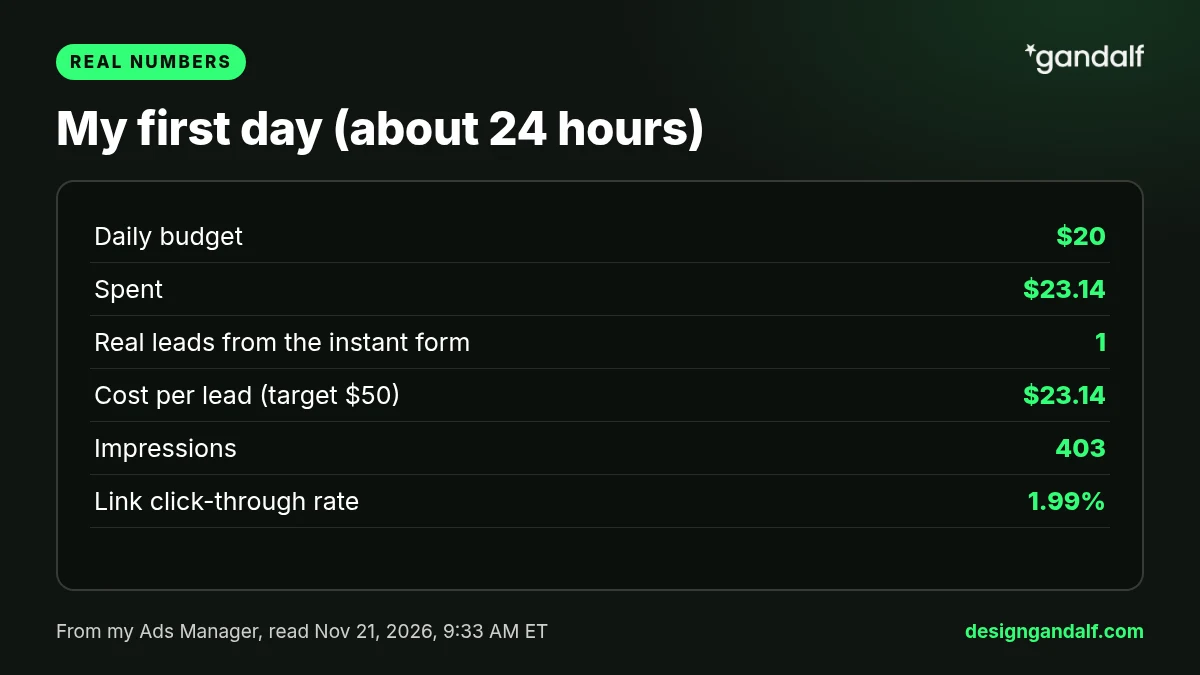
In about the first 24 hours my campaign spent $23.14 and got 1 real lead. That's $23.14 a lead against my $50 goal. A good start, but it's one day, so I'm not changing anything. The full numbers are in part 1.
Want me to set this up for you?
I'm Danny, a web designer in Metro Detroit. If you'd rather have someone set up your ads and the website they point to, tell me about your business and I'll call you back. Or call me at (313) 801-7388.
Tell me about your business