
Part A: Set up your Weekly view
Ads Manager shows a ton of numbers. You only need six. Save them as a view called "Weekly." Then checking your ads takes about a minute.
The 6 numbers that matter
| Column | What it means |
|---|---|
| Amount spent | Money spent |
| Results | Leads. It says "Lead (Form)" under the number. |
| Cost per result | Cost per lead. This is the one you decide with. |
| CTR (all) | Out of everyone who saw the ad, how many tapped it |
| CPM | What it costs to show your ad 1,000 times |
| Frequency | How many times the average person saw it. Over 3 in 30 days? Watch it. |
Or have your AI do it:
In my Meta Ads Manager, on the Ads tab, save a column view called "Weekly" with only these columns: Amount spent, Results, Cost per result, CTR (all), CPM (cost per 1,000 impressions), Frequency. Set the date to Last 7 days. Don't change any ads or budgets. Send me a screenshot when done.
Step 1: Open Customize columns
Tap the Ads tab. Tap the Columns button above the table. Tap Customize columns at the bottom.
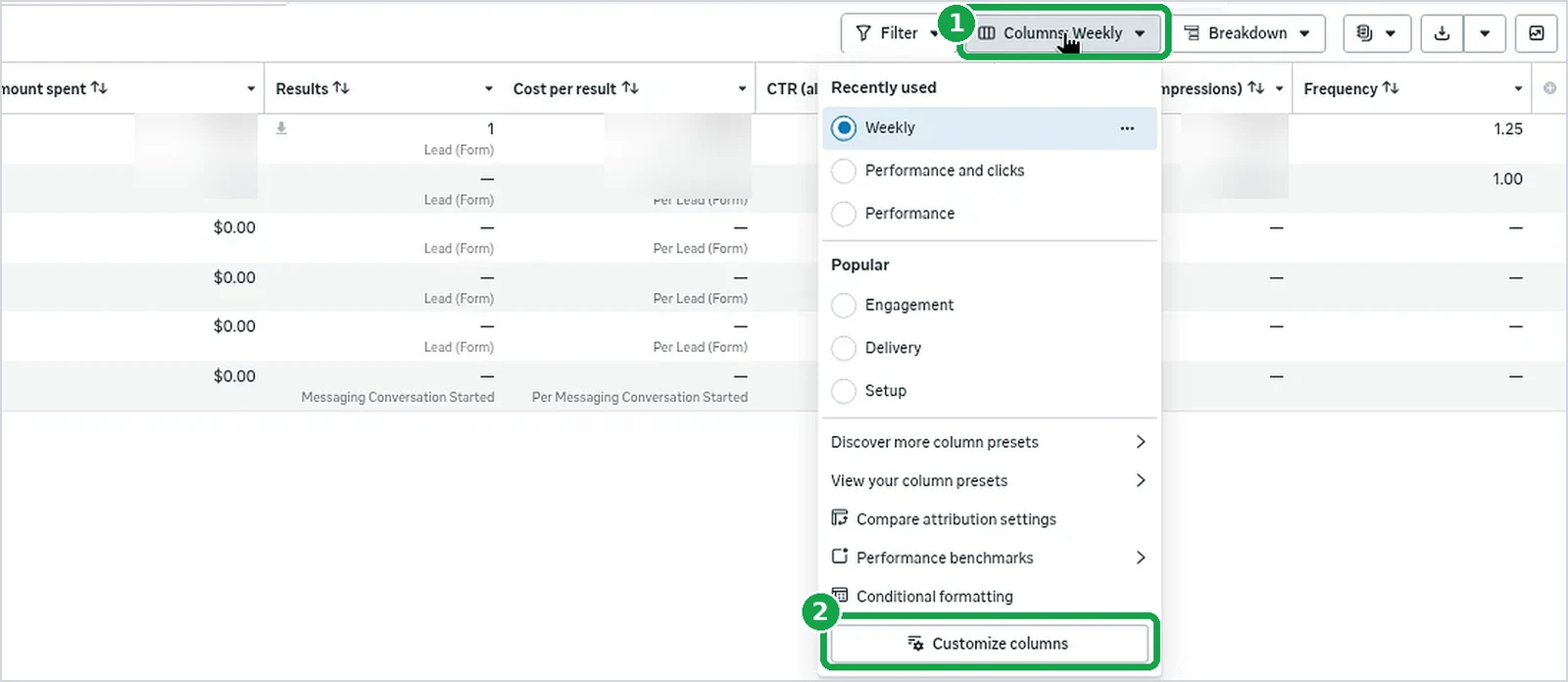
You should now see: a big box called Customize columns.
Step 2: Tick the six numbers
Use the search box to find each one and tick it: Amount spent, Results, Cost per result, CTR (all), CPM, Frequency. Untick anything else you don't need.
My list also shows "Actions." That's OK. It's just a menu column.
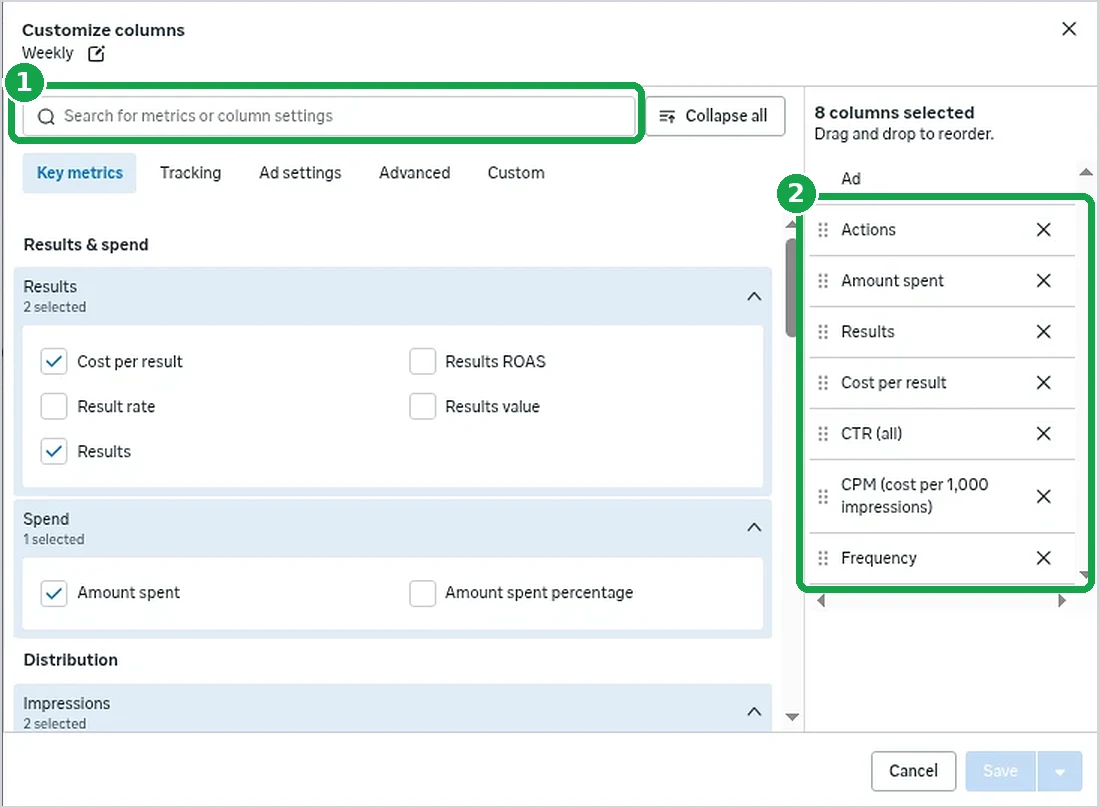
You should now see: the six names in the list on the right.
Step 3: Save it as Weekly
Tick Save as preset, name it Weekly, and tap Apply. Then set the date at the top right to Last 7 days.

You should now see: "Columns: Weekly" above the table and "Last 7 days" at the top right.
Part B: Rule 1, shut off an ad with no leads
My goal is $50 a lead. Two times that is $100. If an ad spends $100 and gets zero leads, it's done.
Rule settings (for a $50 goal)
| Setting | Rule 1 | Rule 2 |
|---|---|---|
| Rule name | Kill ad at 2x target, no leads | Friday rule, no leads this week |
| Made on tab | Ads | Ad sets |
| Apply rule to | All active ads | All active ad sets |
| Action | Turn off ads | Turn off ad sets |
| Conditions (both must be true) | Spent > $100 AND Results < 1 | Spent > $50 AND Results < 1 |
| Time range | Maximum | Last 7 days |
| Schedule | Daily | Custom: Friday, start and end 6:00 AM |
| Notification | On Facebook | On Facebook |
Different goal? Rule 1 = 2 × your goal. Rule 2 = 1 × your goal.
Or let your AI make both rules:
Set up two automated rules in my Meta Ads Manager. My goal is $[GOAL] per lead.

Rule 1, on the Ads tab: name "Kill ad at 2x target, no leads". All active ads. Turn off ads. Spent is greater than $[2 x GOAL] AND Results is less than 1. Time range: Maximum. Schedule: Daily. Notify me on Facebook.

Rule 2, on the Ad sets tab: name "Friday rule, no leads this week". All active ad sets. Turn off ad sets. Spent is greater than $[GOAL] AND Results is less than 1. Time range: Last 7 days. Schedule: Custom, Friday, start and end 6:00 AM. Notify me on Facebook.

Explain each rule in plain English first. Don't use "cost per result" in a rule. Don't change any ads or budgets. Send me a screenshot of both rules showing Enabled.
Step 4: Open Create a new rule
Stay on the Ads tab. Tap More, then Create a new rule, then Custom rule.
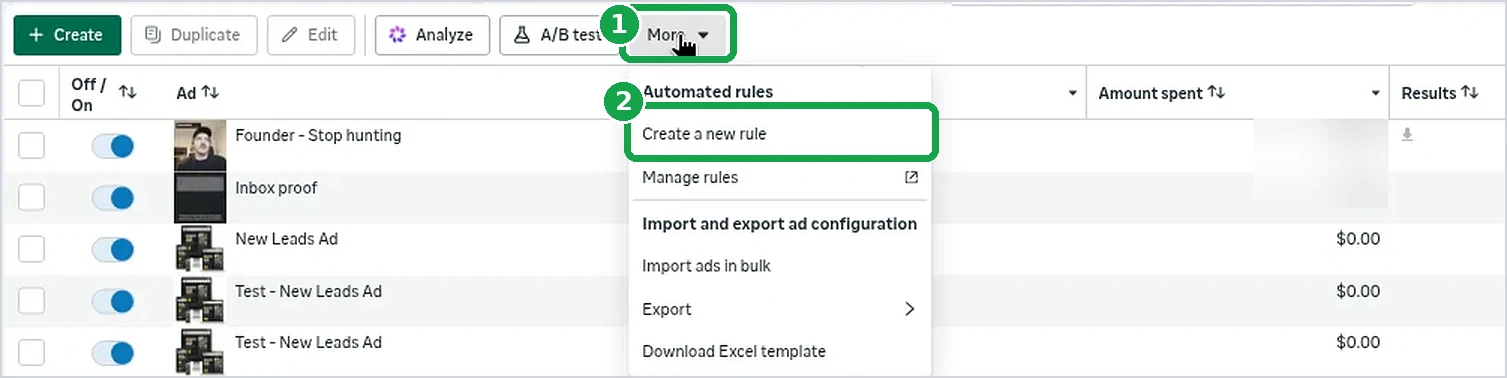
You should now see: a box called Create a custom rule.
Step 5: Fill in rule 1 and tap Create
- Rule name: Kill ad at 2x target, no leads
- Apply rule to: All active ads
- Action: Turn off ads
- Conditions: change "Cost per result" to Spent, pick is greater than, type 100, tap Add. Then add Results, is less than, 1.
- Time range: the one that says Maximum (the ad's whole life)
- Schedule: Daily
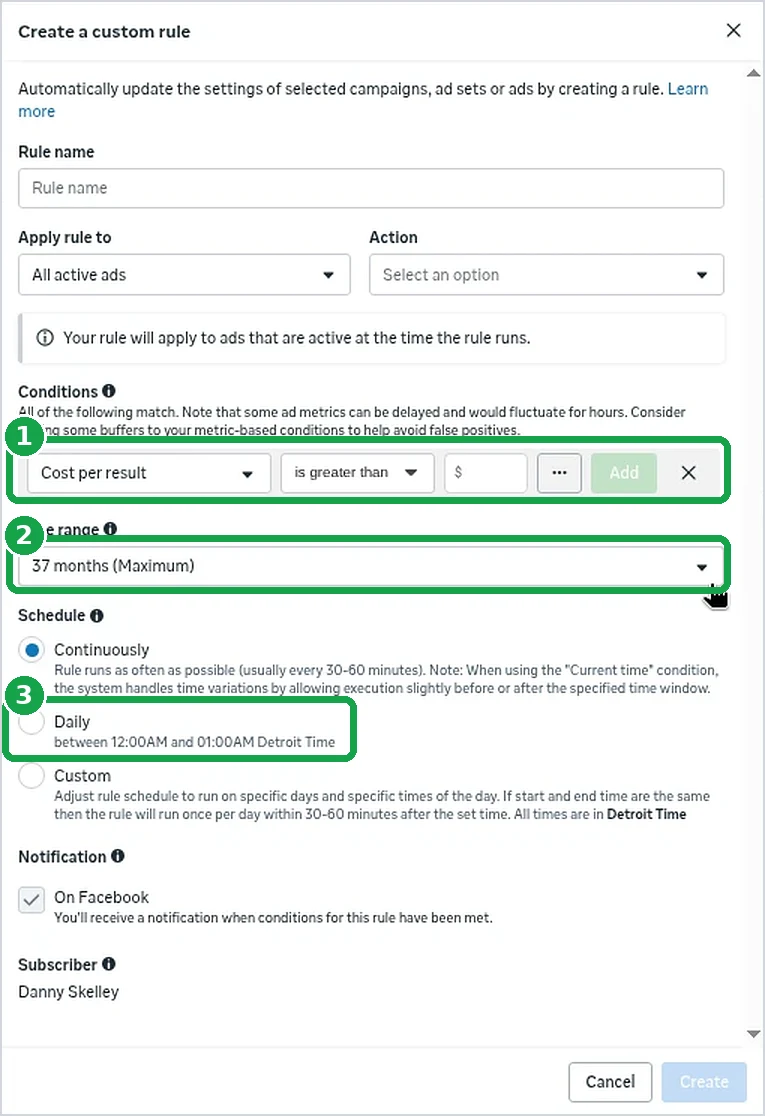
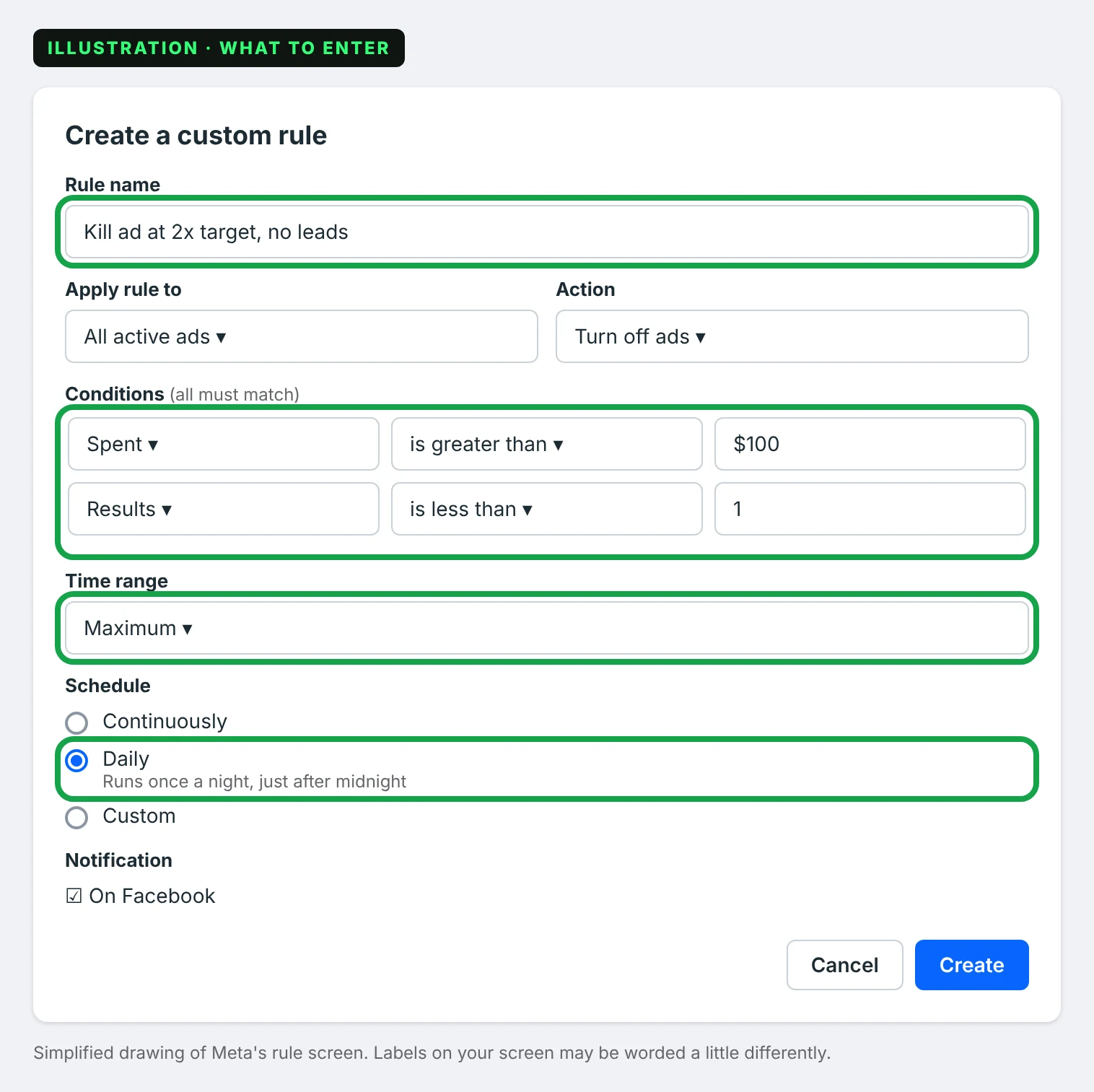
Why Daily? Facebook's numbers can run a few hours behind. Once a night gives a late lead time to show up.
You should now see: the rule in your Automated rules list.
Part C: Rule 2, the Friday rule
This one looks at a whole ad set (who sees your ads and how much you spend) once a week.
Step 6: Make rule 2 on the Ad sets tab
Tap the Ad sets tab. Tap More, Create a new rule, Custom rule. Type:
- Rule name: Friday rule, no leads this week
- Apply rule to: All active ad sets
- Action: Turn off ad sets
- Conditions: Spent is greater than $50 AND Results is less than 1
- Time range: Last 7 days
- Schedule: Custom. Pick Friday. Set start and end to the same time, like 6:00 AM, so it runs once.
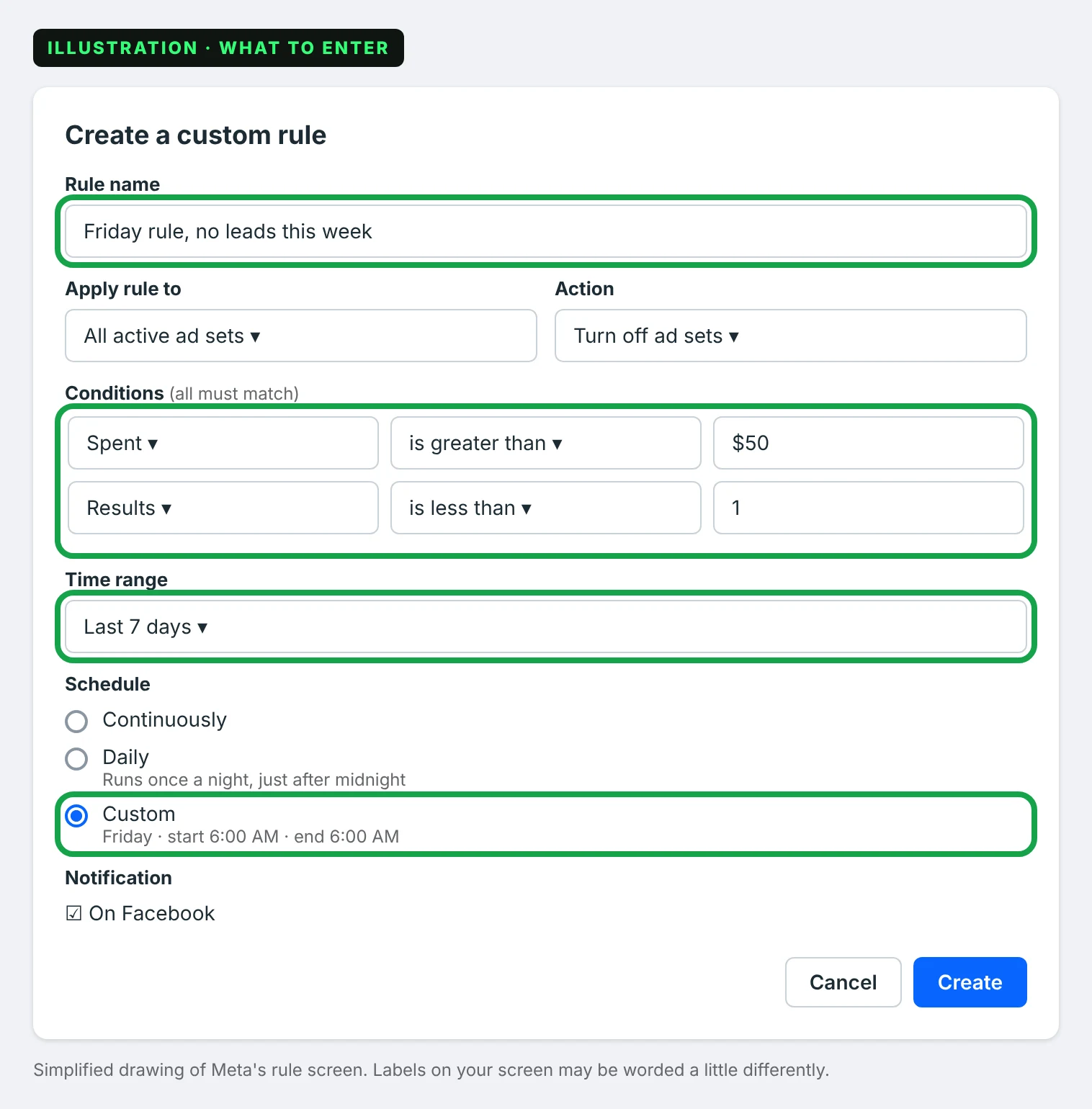
Tap Create. The $50 line means an ad set you started Thursday won't get shut off Friday morning before it had a fair shot.
You should now see: a second rule in your list.
Step 7: Check both rules are on
Open Automated rules (More, then Manage rules). Both should say Enabled.

You should now see: two rules, both Enabled.
Good to know
- Rules only turn things off. They never turn anything back on.
- Turn a shut-off ad back on, and rule 1 shuts it off again that night. Make a new ad instead.
- Don't use "cost per result" in a rule. Spent plus Results does the same job.
- When a rule fires, Facebook sends you a notification. That's your cue to add a fresh ad.
Next
Rules catch the dead ads. You still need to check for leads: where to find Facebook leads.
Want me to set this up for you?
I'm Danny, a web designer in Metro Detroit. If you'd rather have someone set up your ads and the website they point to, tell me about your business and I'll call you back. Or call me at (313) 801-7388.
Tell me about your business